v6.5.0 - Pro AI Mode + Split Layouts

System monitoring,
reimagined.

OmniMon v6.5.0 adds professional AI workflows, Ask AI actions in dashboards, real token streaming, split layouts, stronger i18n, and safer runtime paths across the app.

0
Processes at 60fps
0
Platforms
0
Open Source
omnimon - system overview
Scroll
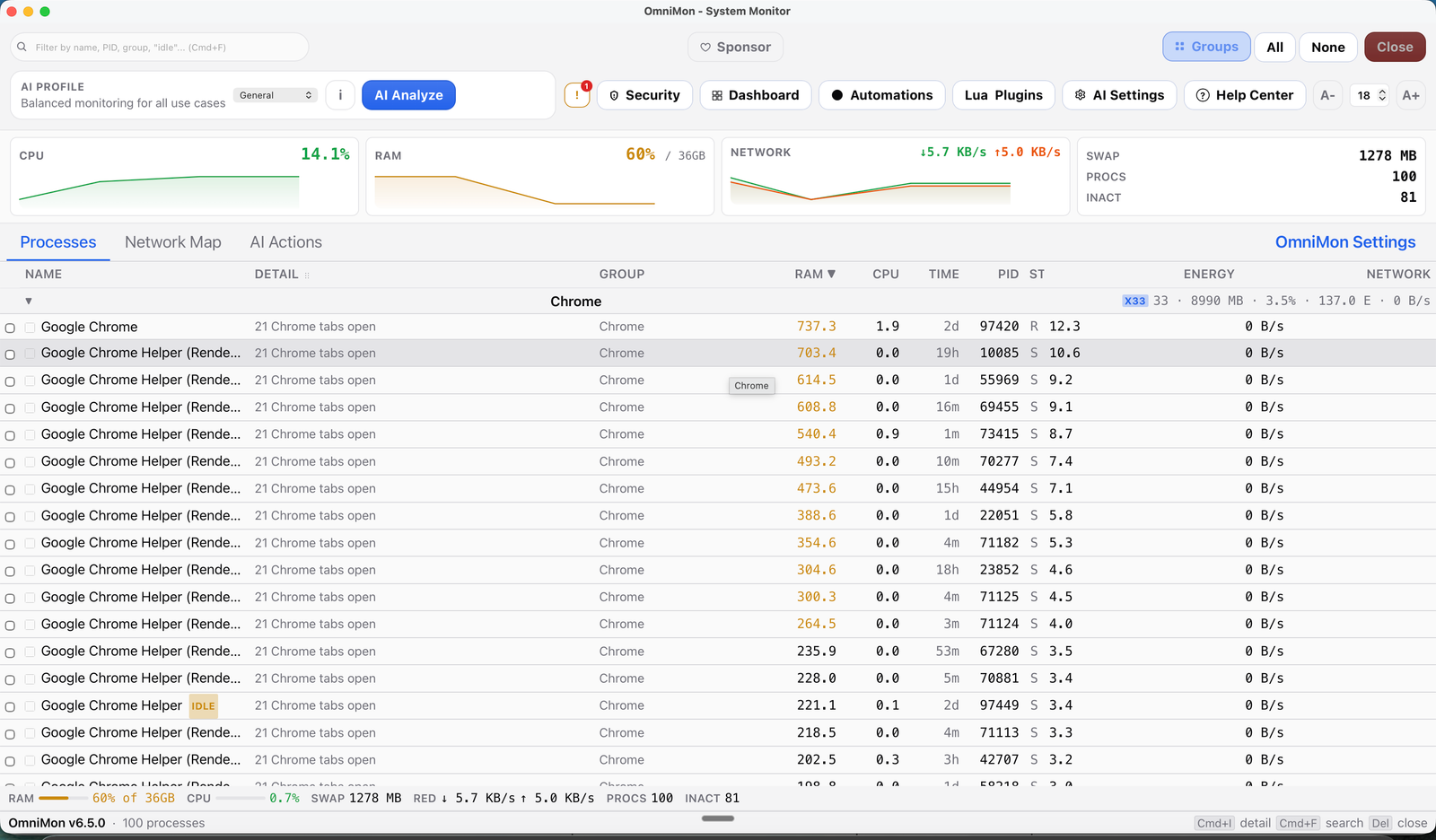
OmniMon v6.5.0 — captura de pantalla de la aplicacion de escritorio
Capabilities

Everything you need to see everything.

Desktop GUI + TUI terminal mode + 15+ CLI commands. Sandboxed Lua plugins, push-based watcher events, packet and connection analysis, 5 AI providers with tool calling, split layouts, and native Lucide-powered UI cleanup for complete visibility and control.

Real-Time TUI + Deep Telemetry

New htop/btop-style TUI mode via omnimon tui - process table, CPU/MEM gauges, AI chat panel, and process kill (K key), all at <2 MB RAM. GUI with grouped processes, native icons, clickable dashboards, virtualized tables, and a Rust core tuned for hot paths, watcher caching, and low-overhead updates.

Learn more

v6.5.0 refines the TUI and desktop experience with grouped process views, corrected CPU context, cleaner alerting, and faster contextual analysis across the stack.

Network Deep Inspection

Per-process network monitoring with a 3-tab layout (Map, Table, Traffic chart), resizable panels, export, and contextual AI chat. Native collectors: libpcap (macOS), WinDivert (Windows), and eBPF/aya (Linux).

Learn more

v6.5.0 keeps the process-level network view and improves day-to-day triage with clearer summaries, contextual AI help, and smoother operator workflows.

Threat Detection

MITRE ATT&CK behavioral mapping (T1055, T1043, T1571), NIST 800-53 compliance, local CVE scanning, and a full security report modal with risk scoring (0-100) and severity breakdown.

Learn more

MITRE ATT&CK is a global knowledge base of cyberattack tactics used by security teams worldwide. OmniMon maps process behavior to known attack patterns - detects DLL injection, process hollowing, suspicious memory reads, unsigned module loads, and unusual port usage. Smart Alerts now debounce transient spikes, group alerts by process, and explain issues in plain language.

Lua Plugin Ecosystem

Extend OmniMon with custom Lua scripts - sandboxed (1 MiB memory, 150ms timeout), no FFI/shell/network access. Upload .lua files, see live metrics, and manage plugins from the GUI. Up to 32 plugins with 64 metrics each.

Learn more

v6.5.0 keeps the plugin sandbox and complements it with stricter key handling, signed releases, and safer automation-friendly defaults across the stack.

Browser Integration

Chrome DevTools Protocol for tab tracking across Chrome, Safari, Brave, Edge, and Arc. Close, focus, or bulk-manage tabs. AI can close tabs by pattern ("close all YouTube tabs").

Learn more

See exactly which browser tab is consuming your resources. Per-browser RAM tracking, inline tab management in process details, bulk close/focus operations, and AI-powered tab control via natural language. Background tab cache refresh ensures data stays fresh without blocking the UI.

AI Chat, Profiles & SRE Automations

5 AI providers (OpenAI, Anthropic, Gemini, OpenRouter, Ollama), professional AI mode, Ask AI dashboard actions, natural-language config bar, and SRE automation rules with SIGTERM -> SIGKILL escalation.

Learn more

OmniMon 6.3.0 adds more expressive profiles, Playwright E2E validation, +46 new Rust tests in plugins and automations, extra IPC hardening, and a stronger documentation and coverage foundation for the next wave of features.

Architecture

Built on the fastest stack.

18 Rust modules, 24 Svelte components, 15 CLI commands. Desktop GUI + TUI + CLI - three interfaces, one Rust core. No Electron. No compromises.

R

Rust Core + mimalloc + TUI

High-performance engine with mimalloc allocator, ratatui TUI crate, embedded Lua 5.4 runtime (mlua), fuzz-tested IPC, and zero-allocation hot paths eliminating ~43K alloc/dealloc cycles per day.

Why Rust?

Why Rust? mimalloc is ~7% faster for small allocations with ~50KB overhead. The new TUI crate uses ratatui + crossterm for a <2 MB terminal interface sharing the same SystemState. Lua plugins run in sandboxed VMs with 1 MiB memory limits and 150ms timeouts.

sysinfo tokio libpcap

Tauri 2

Lightweight desktop framework. Native webview, no bundled browser. ~10MB app size. CrabNebula Cloud distribution.

Why not Electron?

Why not Electron? Electron bundles an entire Chromium browser (~85-100MB). Tauri uses your OS's native webview, cutting the installer to ~10MB and idle RAM from ~200-300MB down to ~30-40MB. Startup drops from 1-2 seconds to under 0.5s.

IPC Bridge Auto-Update Native APIs

Svelte 5

Reactive UI with runes, derived stores, and diff-based updates. Compiled away for low-overhead rendering even under polling-heavy or push-event workloads.

Why Svelte?

Why Svelte over React or Vue? Svelte compiles your components at build time - there's no virtual DOM diffing at runtime. This means smaller bundles, faster rendering, and a UI that feels truly native.

Runes Vite TypeScript
vs. Electron
App size
~10MB
Tauri
~85MB
Electron
Idle RAM
~30MB
Tauri
~250MB
Electron
Startup time
<0.5s
Tauri
~1.5s
Electron
Svelte 5 UI
Tauri IPC
Rust Core
OS Kernel
Get Started

Install in seconds.

Terminal - macOS

$ brew tap chochy2001/omnimon

$ brew install --cask omnimon

# Launch OmniMon

$ omnimon

Having trouble?

macOS: "OmniMon can't be opened" (Gatekeeper)

macOS blocks apps that aren't signed with an Apple Developer ID certificate. Since OmniMon is open-source and community-built, it isn't code-signed yet.

  1. 1 Open System Settings → Privacy & Security
  2. 2 Scroll down to find the message: "OmniMon was blocked to protect your Mac"
  3. 3 Click "Open Anyway" and confirm

Or from Terminal:

$ sudo xattr -rd com.apple.quarantine /Applications/OmniMon.app

You only need to do this once - after the first launch, macOS will remember your choice.

Linux: Permission denied / app won't launch

If the AppImage won't run, make sure it has execution permissions:

$ chmod +x OmniMon-6.5.0-Linux.AppImage && ./OmniMon-6.5.0-Linux.AppImage

For network monitoring features, OmniMon may need elevated permissions. Run with sudo or configure capabilities.

Windows: SmartScreen warning

Windows SmartScreen may block the installer because it's not signed with an EV certificate.

  1. 1 Click "More info" on the SmartScreen popup
  2. 2 Click "Run anyway"

This is normal for open-source software without a code-signing certificate. The app is safe - you can verify the source on GitHub.

Hardened

Security by design.

Every layer is built with defense in depth. Ed25519 digital signatures, AES-256-GCM encryption, and cryptographically verified releases.

Zero Plaintext Credentials

All secrets stored in native OS Keychain (macOS Keychain, Windows Credential Manager, Linux Secret Service). Never written to disk in plaintext.

What does this mean?

API keys and tokens are encrypted at the OS level using your user session. Even if someone copies your OmniMon config files, they can't extract secrets without your login credentials.

MITRE ATT&CK Mapping

Behavioral analysis mapped to T1055, T1043, T1571 and more attack techniques. Real-time security-alert events via Tauri IPC.

What does this mean?

MITRE ATT&CK is the global standard framework that catalogs how cyberattacks work. Used by the FBI, NSA, and security teams at Fortune 500 companies. OmniMon maps your system's process behavior to these known attack patterns - if a process tries to inject code into another (T1055) or communicates on unusual ports (T1571), you get an immediate alert.

Ed25519 Signed Releases

Every release is signed with Ed25519 (NIST FIPS 186-5) and verified with SHA-256 integrity hashes. AES-256-GCM encryption for audit logs and security reports.

What does this mean?

Ed25519 is a modern digital signature algorithm recommended by NIST. Every OmniMon release binary is cryptographically signed - your system can verify the download hasn't been tampered with before installation. Security reports and audit logs are encrypted with AES-256-GCM, the same encryption used by the U.S. military.

Sandboxed Plugins & Fuzz-Tested IPC

Lua plugins run in sandboxed VMs: 1 MiB memory limit, 150ms timeout, no FFI/shell/network. 3 fuzz targets, Token Bucket rate limiting, and AI prompt injection defense with bilingual blocklist.

What does this mean?

The Lua sandbox keeps strict VM memory and timeout limits, while v6.5.0 layers stronger key handling, signed releases, token-bucket rate limiting, and prompt-injection protection across frontend and backend.

Benchmarks

How OmniMon stacks up.

Real benchmarks against the best system monitors on every platform. Numbers matter more than checkmarks.

Feature OmniMon v6.5.0 - All platforms btop++ (Linux) Best on Linux iStat Menus (macOS) Best on macOS Process Hacker (Windows) Best on Windows
Terminal TUI Mode Full htop/btop-style terminal interface with process table, AI chat, and keyboard controls
Plugin Ecosystem Extend the monitor with custom scripts/plugins for user-defined metrics and automations
Native GUI Graphical interface with mouse/keyboard support, not just terminal text
Cross-Platform Runs on macOS, Windows, and Linux from a single codebase
Deep Network Inspection Analyzes network traffic per process at the protocol level - shows what each app sends/receives
MITRE ATT&CK Detection Detects known cyberattack patterns (process injection, suspicious ports) using the global MITRE framework
AI Rules Engine Dynamic alert rules powered by AI - geo-location, network ranges, and memory thresholds
Browser Tab Tracking Maps CPU/RAM usage to individual browser tabs, not just the browser process
Process Management Kill, suspend, or manage processes directly from the interface
Auto-Update Automatically downloads and installs new versions in the background
System Tray / Background Run silently in the system tray with autostart support - always monitoring without a visible window
Local AI / LLM Built-in AI assistant with local LLM support (Ollama) - no cloud required for intelligent analysis
SRE Automations User-defined automation rules with auto-kill, notifications, and temporal pattern correlation
Kernel-Level Inspection Direct access to OS kernel internals for deep driver and handle analysis
No Install Required Works out of the box - pre-installed or available from default package managers with zero config
Menubar Widget Always-visible compact widget in the OS menubar/system tray showing live stats
App Size Total installer download size - lower is better ~10MB ~2MB ~25MB ~3MB
RAM Usage Average memory consumed while running - lower is better ~30MB ~10MB ~45MB ~15MB
Core Language Programming language of the core engine - affects speed and reliability Rust C++ Obj-C C

The verdict per platform

Linux
Best alternative: btop++

btop++ is a beautiful TUI - but it's terminal-only, Linux-only, no network DPI, no security. OmniMon v6 now has its own TUI mode (omnimon tui) PLUS a full GUI, Lua plugins, threat detection, deep network analysis, and AI chat - all cross-platform.

macOS
Best alternative: iStat Menus

iStat Menus is a polished paid menubar monitor ($11.99). Great for quick CPU/RAM glances but no per-process network inspection, no threat detection, and macOS-only. OmniMon gives you deeper visibility - free and open source.

Windows
Best alternative: Process Hacker

Process Hacker (now System Informer) is the most powerful Windows process manager. Excellent kernel-level inspection, but Windows-only, no network DPI, and no MITRE ATT&CK mapping. OmniMon matches its process management and adds security intelligence across all platforms.

0
App bundle size
vs ~85MB Electron apps
0
UI refresh rate
smooth as a native game
0
Avg. RAM usage
vs ~200MB Electron apps
Why OmniMon

Why this is the best option.

Other monitors show you numbers. OmniMon tells you what those numbers mean - and what to do about them.

26 attack techniques

The only monitor with security intelligence

htop, btop, Glances, Activity Monitor - none of them detect threats. OmniMon is the only open-source system monitor that maps process behavior to MITRE ATT&CK attack patterns and alerts you in real time. It's not just monitoring - it's defense.

detected in real time
8.5 x lighter

8.5x lighter than Electron alternatives

Apps built with Electron (VS Code, Slack, Discord) consume 200-300MB of RAM just to idle. OmniMon uses Tauri 2 + Rust - native speed, native webview, ~30MB RAM. Your monitoring tool shouldn't be the heaviest process on your machine.

than Electron apps
<2 % CPU overhead

Per-process deep network inspection

No other free system monitor shows you what each process sends and receives on the network at the protocol level. OmniMon uses libpcap, WinDivert, and eBPF to give you full network visibility - without root on Linux via eBPF/aya.

for full network analysis
10 major releases

Actively maintained, constantly evolving

OmniMon isn't abandoned software. It receives regular updates with new features, security patches, and performance improvements. v6.5.0 adds redesigned profiles, Playwright E2E validation, stronger IPC hardening, and more mature coverage and documentation across the project.

in active development
MIT licensed

100% free, 100% open source, forever

No freemium tricks, no premium tiers, no telemetry, no ads. MIT licensed - you can read every line of code, fork it, modify it, and use it commercially. The best tools are the ones the community owns.

free forever - no catch
1 engineer

Built by an engineer, not a corporation

OmniMon is built by Jorge Salgado Miranda, a software engineer from UNAM, Mexico. No VC funding, no growth metrics, no user tracking. Just a tool built to solve a real problem - made with care and shared with everyone.

building something great
Open Source

Built by the community.

OmniMon is MIT licensed and open to contributions. Whether you're fixing a bug, adding a feature, or improving docs - every contribution matters.

Created by
Jorge Salgado Miranda
Software Engineer - UNAM
jorgesalgadomiranda.com
MIT License
Free to use, modify, and distribute.